









Selling through several channels becomes difficult when product details, stock counts, orders, and tracking updates live in separate systems. What is ecommerce integration? It is the process of connecting ecommerce platforms, marketplaces, warehouses, shipping tools, and other operational systems so important data can move between them without repeated manual entry.
The goal is not to connect every tool a business uses. It is to create a dependable operating flow where the team knows which system owns each record, what information should synchronize, and where to investigate when something does not match.

What Is Ecommerce Integration?
At its core, what is ecommerce integration? It is a form of system integration that allows ecommerce systems to exchange information, including product data, available stock, incoming orders, shipping updates, returns status, and cost data.
For sellers, the value is practical. A product update entered in one approved location can reach the channels that need it, while a sale on one storefront can reduce available inventory before the same unit is sold elsewhere.
Start by Mapping the Data That Must Move
The practical answer to what is ecommerce integration begins with data flows, not software features. Before connecting a marketplace, warehouse, or shipping tool, identify what information moves, where it starts, who uses it next, and what should happen if the transfer fails.
A business does not need every system to share every field. Prioritize the information that affects the customer promise, fulfillment decision, or true sales result.
| Data flow | Typical source | Where it needs to go | Risk when disconnected |
|---|---|---|---|
| Product details | Product catalog | Storefronts and marketplace listings | Incorrect titles, images, variants, or attributes |
| Available stock | Warehouse or inventory system | Active sales channels | Overselling, cancellations, and stockouts |
| New orders | Marketplace or ecommerce platform | Order and fulfillment workflow | Late dispatches and missed buyer updates |
| Tracking details | Shipping tool or carrier | Selling channel and customer communication | Orders appear unshipped after dispatch |
| Fees and costs | Marketplace, carrier, ad platform, supplier data | Profit reporting | Revenue looks stronger than actual margin |
Assign an Owner to Each Record
Without clear ownership, ecommerce integration can spread incorrect information faster. Teams should identify one approved source for product details, available stock, order status, and cost information before systems begin syncing.
Marketplaces can still require their own fields, policies, and buyer-facing settings. The key is knowing which system can create, overwrite, or approve a change.
Build Product Data From One Master Record
Create a master record for each SKU that includes identifiers, titles, variants, dimensions, images, and base descriptions. Use catalog field mapping to adapt that approved data to marketplace-specific requirements without rebuilding each product record separately.
This helps reduce variation errors when the same item is sold through Amazon, Walmart, eBay, Shopify, or another storefront.
Define What “Available Stock” Actually Means
Available stock is not always the same as physical stock. Open orders, safety buffers, damaged units, warehouse transfers, bundles, and marketplace commitments can reduce what a seller can honestly promise.
A real-time availability sync helps update connected channels when a sale, return, receipt, or adjustment changes the count. The team should still define which stock statuses are sellable and which are held, quarantined, or in transit.
Bring Orders Into One Working Queue
Orders need to reach the fulfillment team with the information required to act: channel, items, shipping service, delivery deadline, payment status, and buyer instructions. An order ingestion workspace can reduce manual exports and make exceptions easier to spot before dispatch deadlines are missed.
Treat Connection Failures as Operating Events
Integration problems often appear at the edges of the workflow. A standard product may sync correctly, while a bundle, variation, partial cancellation, or return does not.
Watch for these issues before expanding a connection:
- Product identifiers that differ between the catalog, marketplace, and warehouse
- Variants or bundles that do not adjust component inventory correctly
- One-way syncs that do not return tracking, cancellation, or refund updates
- Conflicting price rules across channels
- Manual stock adjustments made outside the approved process
- Failed updates that do not alert the right team
The right response is not simply reconnecting the system. Investigate the record, rule, or process that caused the mismatch and document the correction.
Roll Out Integrations in Order of Business Risk
The first integration priority is preventing errors that directly affect customers and revenue. Start with product records, available inventory, and incoming orders before adding lower-priority reporting or workflow connections.
A controlled rollout is safer than connecting every channel at once. Begin with a limited product group, compare records during real transactions, and expand only after the team trusts the results.
| Launch stage | What to confirm | Evidence the connection is reliable |
|---|---|---|
| Catalog connection | SKUs, variants, images, and attributes | Listings match the approved product record |
| Inventory connection | Available quantity, buffers, and location rules | A sale reduces stock correctly on every channel |
| Order connection | Order details, holds, and fulfillment requirements | New orders arrive without manual exports |
| Shipping connection | Carrier, tracking, and dispatch status | Customers and marketplaces receive correct updates |
| Financial connection | Fees, refunds, and fulfillment costs | Margin reporting reflects real channel costs |
Test Exceptions Before You Trust the Connection
A successful test is not only a standard order that flows through correctly. Test an oversell, partial cancellation, return, address issue, bundle sale, stock transfer, and tracking delay.
Document who owns each exception and what must be corrected. This helps the team distinguish a process issue from a technical issue and stops temporary workarounds from becoming permanent habits.
Measure Integration Quality Through Sales Operations
The best measure of ecommerce integration is not the number of systems connected. Review whether it reduces customer-impacting errors and gives the team faster, more reliable decisions.
Track oversells, order holds, late dispatches, listing errors, failed updates, manual corrections, and the time needed to investigate a mismatch. If those problems decline while the business adds channels or order volume, the integration is supporting scalable operations.
Conclusion: Connect Data Before You Add Complexity
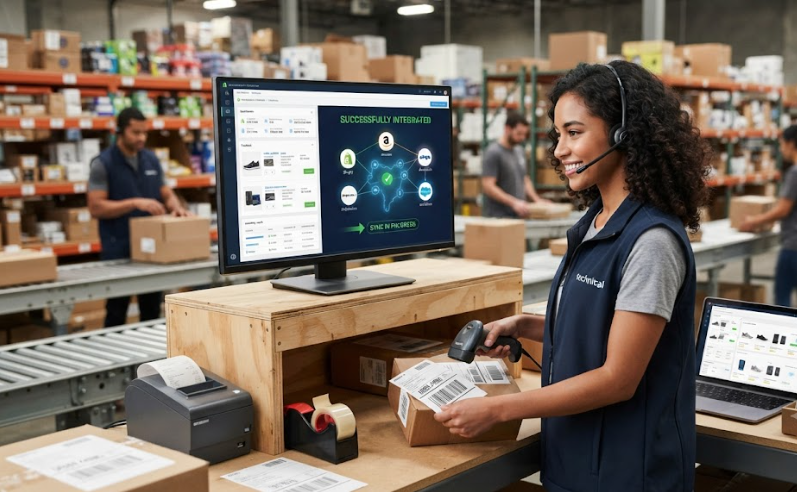
What is ecommerce integration? It is the controlled movement of product, inventory, order, shipping, and cost data between the systems that support ecommerce sales. Sellers that define data ownership, test exceptions, and connect high-risk workflows first can expand to more channels without creating new silos.
Crazy Vendor helps sellers connect marketplaces, storefronts, inventory, orders, shipping, fulfillment, customer support, and profit reporting within a single controlled ecommerce operation.