










Learning how to find keywords for Amazon listing pages matters because shoppers search with specific words before they ever see your product. A good listing should match the way buyers describe the item, compare options, and narrow their choices.
For brand owners, high-intent indexing impacts more than visibility. Keywords establish proper customer expectations, lower PPC customer acquisition costs, and drive conversion metrics. The goal is programmatic alignment with search volume, not text-stuffing.

Step-by-Step Guide to Find Keywords for Amazon Listing Pages
Optimizing an ASIN requires a structured research workflow to target profitable search volume without slowing down catalog updates.
Step 1: Define the product clearly
List the product type, size, material, color, main feature, use case, and buyer need.
Step 2: Check Amazon search suggestions
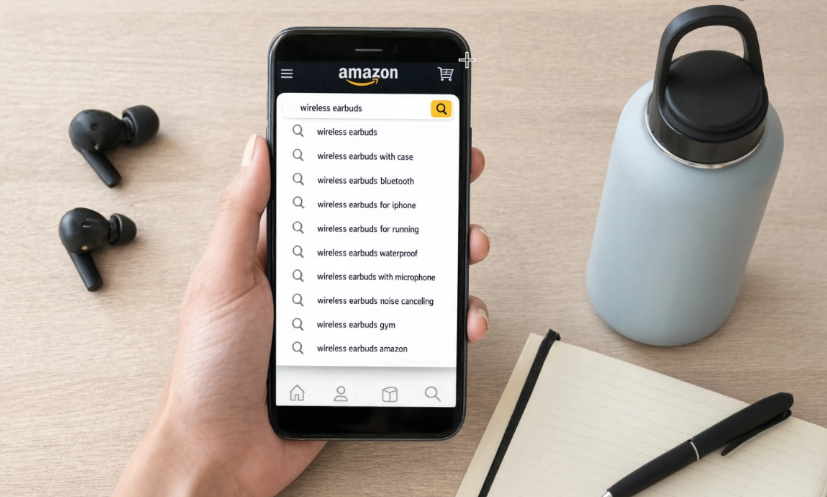
Type the main product name into Amazon search and save phrases that match the item.
Step 3: Review competitor listings
Look at strong listings in the same category and note repeated product terms, features, and use cases.
Step 4: Read reviews and customer questions
Look for buyer language, common concerns, sizing questions, compatibility issues, and missing details.
Step 5: Check ad search terms
Review which terms bring clicks, orders, or wasted spend.
Step 6: Place keywords carefully
Use the best terms in the title, bullets, description, backend search terms, and product image planning.
Step 7: Review performance after updates
Track clicks, sales, conversion, returns, and stock movement after changing the listing.
Start With the Product, Not the Tool
Before using keyword tools, sellers should define the product clearly. What is it? Who is it for? What problem does it solve? What size, material, color, feature, or use case matters most?
This first step keeps keyword research grounded. A seller listing a stainless steel water bottle should not only think about “bottle.” Buyers may search for insulated water bottle, leakproof bottle, gym water bottle, travel bottle, or kids water bottle depending on the product.
If you want to find keywords for Amazon listing pages, start with the words a real buyer would use when they are ready to compare products.
Study Amazon Search Suggestions
Amazon search suggestions can show how shoppers phrase their searches. Type the main product name into the Amazon search bar and review the autocomplete suggestions. These phrases can reveal product features, sizes, buyer needs, and common modifiers.
For example, a seller typing “desk organizer” may see suggestions related to drawers, wood, office, small desk, or file storage. Those suggestions can help sellers understand what buyers expect.
Do not copy every phrase. Save the ones that match the product accurately.
Check Competitor Listings Carefully
Competitor listings can help sellers find keywords for Amazon listing drafts, but copying is not the goal. Study the title, bullet points, product description, images, and customer questions of strong listings in the same category.
Look for repeated product terms, feature words, use cases, and buyer concerns. Also look at weaker listings. If competitors miss important details, your listing may have room to explain the product better.
Use this table to organize keyword research:
| Keyword Source | What to Look For | How to Use It |
| Amazon search suggestions | Common buyer phrases | Build a list of relevant search terms |
| Competitor titles | Main product terms and features | Identify important wording in the category |
| Reviews | Buyer language and pain points | Add words that match real customer concerns |
| Customer questions | Missing information | Improve bullets, FAQs, and images |
| Ad reports | Search terms that drive clicks or sales | Keep high-performing terms and remove weak ones |
| Support tickets | Repeated buyer confusion | Add clearer product details to the listing |
Raw keyword data is only valuable when translated into optimized listing copy that drives on-page conversions.
Use Reviews and Questions for Buyer Language
Reviews and customer questions often show the words buyers use after purchase. This is useful because buyers may describe the product differently than sellers do.
A seller may call a product “compact storage container,” while buyers may say “small pantry bin,” “stackable box,” or “fridge organizer.” Those phrases can improve listing language if they match the product.
Support questions can also reveal missing keywords. If buyers keep asking whether a part fits a certain model, that compatibility term may belong in the listing, images, or FAQ.
Crazy Vendor’s customer service management can help sellers track repeated buyer questions that may point to missing listing details.
Place Keywords Where They Help the Buyer
After sellers find keywords for Amazon listing pages, they need to place them carefully. Important terms usually belong in the title, bullet points, product description, backend search terms, and image-related planning.
Once the terms are verified, optimizing an Amazon listing for search connects them with readable titles, useful product information, and accurate supporting content.
The title should describe the product clearly. Bullet points should explain features, benefits, size, material, compatibility, and package contents. The description can support use cases and buyer questions.
Avoid repeating the same phrase too many times. Repetition can make the listing harder to read. Good keyword research should support clarity, not replace it.
Sellers using product listing management can keep listing updates easier to manage when keywords, product details, and channel requirements need regular review.
Match Keywords With Inventory and Sales Data
Keyword research should not stop after publishing. Sellers should compare keyword changes with sales, clicks, conversion, returns, and stock movement.
If a keyword brings traffic but buyers do not purchase, the listing may not match the shopper’s intent. If a product gets more orders after a keyword update, sellers need to make sure inventory can keep up.
A multi-channel inventory management systemcan help sellers keep stock visibility cleaner when listing changes increase demand.
Review Search Terms From Ads
Amazon ad reports can show which search terms led to clicks, orders, or wasted spend. These reports help sellers separate high-intent keywords from phrases that only bring traffic.
A strong keyword should match the product and support sales. A weak keyword may attract the wrong shoppers, increase ad cost, or create returns if the product does not meet expectations.
Sellers can use multi-channel profit analytics to compare whether keyword-driven traffic supports margin after ads, returns, shipping, and fees.
Conclusion: Find Keywords for Amazon Listing Pages With Buyer Intent in Mind
The best way to find keywords for Amazon listing pages is to start with buyer intent. Use Amazon suggestions, competitor listings, reviews, questions, ad reports, and support data to understand how shoppers search and what they need to know before buying.
Crazy Vendor helps sellers connect Amazon keyword updates with the work that follows, including product details, buyer questions, inventory movement, sales performance, and product-level profit.